


AI Home Design: ReHouse
4.413.00 Reviews
App Specs
- Version
- 1.6
- Updated On
- License
- Free
- Downloads
- 10,000+
- Developer
- Flowmatic
- Categories
- House & Home
- Platform
- Android
Screenshots

 Analysis by AppCompare
Before opening a design app, I find it helps to decide what I actually want to change: the room’s mood, one awkward corner, or the arrangement of major furniture. That small bit of planning makes AI Home Design: ReHouse more useful, because the ideas are easier to judge when they have a real purpose. I’d treat it as a visual planning tool for exploring possibilities, not as a substitute for measuring a room or checking whether a piece of furniture will fit.
A practical first pass
For a first session, I’d choose a room that is easy to photograph and has a clear goal. A living room that feels crowded, for example, is a better test than a whole home where every space has a different problem. Take photos that show the room as it is, then look at the generated options for patterns: what changes in the color palette, how the furniture is presented, and which suggestions keep the room’s existing character.
I would not try to make a final decision from one image. Compare several concepts, and note the parts you like independently of the overall look. Perhaps one version has a more appealing wall color while another suggests a better furniture arrangement. Keeping those observations separate helps prevent a polished render from making every element seem equally practical.
Small choices that improve the workflow
Photo choice matters in any image-based design workflow. I’d clear away temporary clutter where possible, take the picture from a position that shows the room’s main features, and avoid judging a result too harshly if the source image hides a corner or important piece of furniture. These are simple habits rather than special app controls, but they make it easier to compare suggestions against the room you actually live in.
It is also worth deciding what must stay before browsing styles. If a sofa, desk, or family heirloom is non-negotiable, keep that constraint in mind as you review concepts. AI-generated inspiration can be useful even when it proposes a different setup, but a design that only works by removing something you need is not a useful plan for your home.
Where a visualization can mislead
A convincing room image is not a building plan. I would verify dimensions, walking space, door clearance, light sources, and practical storage separately before buying anything or moving heavy furniture. The app can help me picture a direction; it cannot replace checking the actual room or deciding whether a proposed change works with daily routines.
That distinction is especially important when considering finishes or large purchases. A color that looks calm in a generated image may feel different in your home’s daylight, and a visually neat layout may leave too little room to walk around. I’d use the app to narrow down ideas, then test shortlisted colors and measure furniture before committing.
Worth Reading Before You Choose

Baby Panda World Brings Quick Play to Modern Phones, but Its Game Library Feels Busy

ESPN’s Live Game View Makes Following Close Games Easier

QuizzLand Review: A Good Fit for Short Trivia Breaks, Not Every Player

Basketball Stars: Multiplayer Is Fast, but Can It Recover When Matches Go Wrong?

WEBTOON Turns Phone Updates Into a Better Reading Routine

Link to Windows Runs on Shared Habits, Not Social Feeds
Who will get the most out of it
This is a good fit for renters planning reversible changes, homeowners collecting ideas before a refresh, and anyone who finds blank mood boards hard to imagine in a real room. It can also help a couple or housemates discuss preferences: rather than arguing over abstract words like “modern” or “cozy,” you can react to concrete visual directions and decide what feels closer to home.
I’d be less enthusiastic if you need precise architectural drawings, renovation quotes, or dependable measurements for construction. In those cases, a room planner with explicit dimensions or help from a qualified professional is a better match. ReHouse is most useful earlier in the process, when you are still exploring style and want a quick way to make a room feel different before spending money.
That makes it different from the usual alternatives. Pinterest and similar inspiration feeds are strong for collecting references, but they leave you to imagine how an idea translates into your own room. A conventional floor-plan tool is better for exact placement and dimensions, though it can take more effort to build a room before seeing a result. ReHouse sits between those approaches: it offers room-specific visual inspiration, while still requiring your own checks for real-world fit.
For a realistic everyday use, imagine coming home to a living room that feels dull but not knowing whether the issue is the wall color, the furniture, or the overall style. I’d photograph it, explore a few different visual directions, and save the most useful ideas as a short list of changes to investigate. That could mean testing a warmer palette first, rather than replacing several large items at once. The benefit is not just a new look; it is a more considered starting point for a modest refresh.
One useful trade-off is that a range of options can inspire you but also make it easy to chase novelty. I’d set a simple limit for a session: choose one room, compare a handful of directions, then stop and decide what is genuinely workable. That habit keeps browsing from turning into an endless cycle of attractive concepts that do not account for budget, existing belongings, or how the room is used.
People often wonder whether an AI design app can make the decision for them. I don’t think that is the right expectation here. It can help you see alternatives, but your priorities still matter more: how many people use the room, what needs to be stored, and which changes are affordable or reversible. Likewise, a generated design should not be treated as proof that a recommended item is available, correctly sized, or the best value for your needs.
It is also sensible to start with a low-stakes room or a small visual change if you are unsure how much the results will suit your taste. That gives you a chance to learn what kinds of suggestions are useful to you without making an expensive commitment. For a major renovation, I would use the app for early inspiration and bring the practical questions—measurements, materials, and installation—to the appropriate planning tools or professionals.
With that more grounded approach in mind, the app’s first-run experience is easy to understand.
Getting Started with AI Home Design: ReHouse
First things first, getting started with AI Home Design: ReHouse is a breeze. Right after downloading and installing, you’re welcomed with a slick interface that’s both intuitive and easy on the eyes. No convoluted menus or overwhelming options—just a clean layout inviting you to start designing your dream space.
Once you’re in, the app asks you to upload photos of your current space. This is where the magic begins. Using advanced AI algorithms, it analyzes your room's dimensions, existing furniture, and overall vibe to generate design suggestions. It’s like having an interior designer in your pocket, but without the hefty price tag.
The Features That Stand Out
What really sets this app apart is its AI-driven design recommendations. You’re not just getting generic layout options; the suggestions are tailored to your specific space, taking into account lighting, colors, and even your personal style preferences. It's impressive how the app manages to balance functionality with aesthetics.
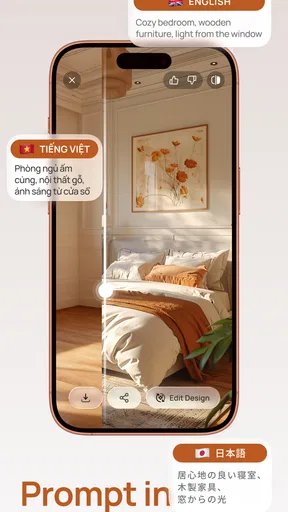
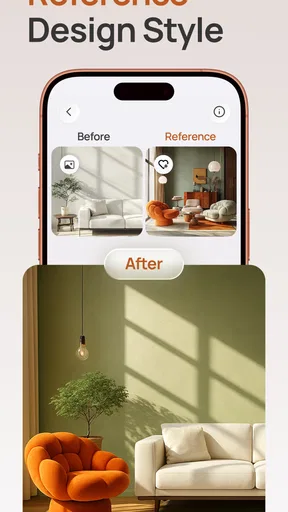
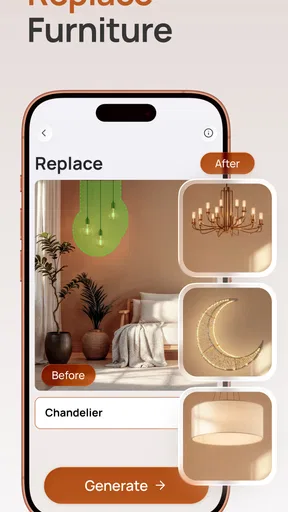
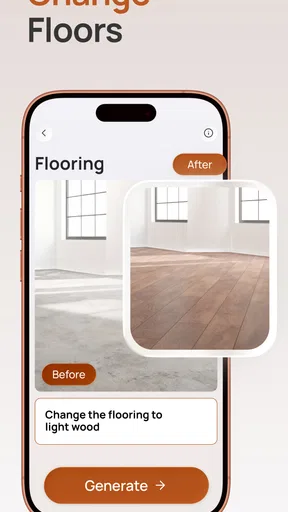
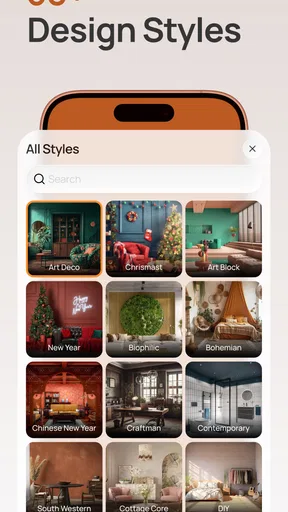
Another standout feature is the ability to experiment with different styles. Whether you're into minimalism, boho chic, or industrial vibes, the app offers a vast array of design templates. You can mix and match elements effortlessly, seeing changes in real-time with just a few taps.
Personal Experience: Playing Designer
I decided to test the app on my rather dull living room. After uploading a couple of photos, I was amazed at how quickly the app generated a variety of layouts. I could see my room transformed with different color palettes and furniture styles. The built-in virtual reality feature was a game-changer, allowing me to "walk through" my redesigned space and make adjustments on the fly.
The shopping integration also caught my eye. The app links directly to online stores where you can purchase recommended items. Talk about convenience! It’s like having a personal shopper who knows exactly what your space needs.
Room for Improvement
No app is perfect, and AI Home Design: ReHouse is no exception. While the AI is generally spot-on, there were a few instances where the recommendations didn’t quite align with my taste. Occasionally, the app suggested items that were a bit outside my budget, but luckily, there are filters to narrow down options based on cost.
Another minor hiccup was the occasional lag during the rendering process. It’s not a deal-breaker, but something to keep in mind if you’re running it on an older device.
Making the suggestions work for you
I get the best value from a design suggestion when I treat it as a starting point, then translate it into a realistic shopping or decorating decision. If a concept feels right, I’d identify the two or three visible changes that create its effect, rather than assume I need to reproduce every object in the image. A new palette and a better arrangement may be enough to change how the room feels, while keeping useful furniture in place.
The shopping links can be handy when I want to investigate an item, but I would still compare options and check dimensions before buying. A linked product is a lead, not a guarantee that it suits my space or budget. If I already own something similar, I’d first see whether the visual idea can be recreated with what I have; that is often a more practical way to use inspiration than turning every generated room into a purchase list.
There is also a useful distinction between inspiration and a decision. I’d keep a short note of what each promising concept gets right—perhaps a lighter color scheme, more open-looking furniture placement, or a calmer style—and use that to guide the next round of choices. This makes the app easier to revisit without starting from scratch mentally, even if I am only using it to clarify my own preferences.
As a House & Home app, AI Home Design: ReHouse is free to install, with optional in-app purchases ranging from $4.99 to $59.99 per item. It is developed by Vulcan Labs and has a 4.5 average from around 350 ratings, with over 10,000 installs. The app is rated for Everyone, and version 1.4 requires Android 7.0 or later. Those details make it approachable to try, though I’d check the purchase screen carefully if I reach a paid option and only spend when I understand what it unlocks.
The app is especially appealing if you want a low-pressure way to explore looks before deciding whether to repaint, rearrange, or shop. The free starting point lowers the barrier to experimenting, while the paid items mean it is worth being deliberate rather than tapping through purchase prompts casually. If your priority is a no-cost, dimension-first floor plan, a traditional planner may suit you better; if you want visual ideas tied to photos of your own room, this is the more natural place to begin.
Its release on September 9, 2025, also makes it a relatively recent option in a crowded home-design space. I would focus less on novelty and more on whether its image-based suggestions help me make a decision. The version currently available is 1.4, so I’d keep expectations centered on the experience it offers now rather than assuming it can replace professional planning or solve every renovation question.
Final Thoughts
Overall, AI Home Design: ReHouse is a fantastic tool for anyone looking to refresh their home without breaking the bank. It’s user-friendly, offers personalized design suggestions, and brings a touch of innovation to home improvement. Whether you're a design novice or a seasoned pro, this app is worth exploring. Just be prepared to spend a lot of time reimagining your spaces because once you start, it’s hard to stop!
If you’re ready to embark on your home design adventure, you can download AI Home Design: ReHouse for both Android and iOS and see for yourself what the buzz is about. Who knew redesigning your home could be this fun and easy?
Pros
- Intuitive user interface for easy navigation.
- Rich library of design templates available.
- Real-time 3D visualization of designs.
- AI suggests personalized design solutions.
- Compatible with both Android and iOS devices.
Cons
- Limited free features; premium needed for full access.
- Occasional lags on older devices.
- Requires constant internet connection.
- High battery consumption during usage.
- Some advanced features can be complex for beginners.
FAQs for AI Home Design: ReHouse
What is AI Home Design: ReHouse?
AI Home Design: ReHouse is an innovative app designed to help users visualize and plan home renovations with the assistance of artificial intelligence. It offers a wide array of design tools and features, allowing users to create detailed layouts and explore different styles and materials before committing to any changes.
How does AI Home Design: ReHouse utilize AI technology?
The app leverages AI technology to provide personalized design suggestions based on user preferences and property specifications. It can analyze room dimensions, suggest optimal furniture arrangements, and propose color palettes, making the design process more efficient and tailored to individual tastes.
Is AI Home Design: ReHouse suitable for beginners?
Absolutely! AI Home Design: ReHouse is designed with a user-friendly interface that caters to both beginners and experienced designers. Its intuitive controls and step-by-step guidance make it easy for anyone to start designing their dream home without prior experience in interior design.
What platforms is AI Home Design: ReHouse available on?
AI Home Design: ReHouse is available for both Android and iOS devices. Users can download the app from the Google Play Store or Apple App Store, ensuring accessibility across a wide range of smartphones and tablets for convenient design on the go.
Does AI Home Design: ReHouse offer real-time collaboration features?
Yes, the app includes real-time collaboration capabilities, allowing users to share their designs with friends, family, or professional designers. This feature is perfect for getting feedback, making collective decisions, and ensuring that everyone involved in the project is on the same page.


